


date_range 6 ay önce
comment Yorum Yok
trending_up 10 kez okundu
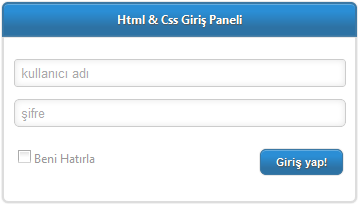
Tasarım Bölümü Html & Css Giriş Paneli yapımı
Bir div oluşturup ona id verelim.
<div id="girisPaneli"></div> |
Oluşturduğumuz girisPaneli divimize sabit genişlik verip arka plan rengini belirtelim.
#girisPaneli { width: 655px; background-color: #fff; } |
Giriş paneli kutumuzun başlık kısmını yapalım.
HTML
<div id="girisPaneli"> <div class="girisBaslik">Html & Css Giriş Paneli</div> </div> |
CSS
#girisPaneli { width: 355px; margin: 0 auto; background-color: #fff; font-family: Segoe UI; } .girisBaslik { background-image: linear-gradient(bottom, #2D72A4 25%, #2B8ED5 75%); background-image: -o-linear-gradient(bottom, #2D72A4 25%, #2B8ED5 75%); background-image: -moz-linear-gradient(bottom, #2D72A4 25%, #2B8ED5 75%); background-image: -webkit-linear-gradient(bottom, #2D72A4 25%, #2B8ED5 75%); background-image: -ms-linear-gradient(bottom, #2D72A4 25%, #2B8ED5 75%); background-image: -webkit-gradient( linear, left bottom, left top, color-stop(0.25, #2D72A4), color-stop(0.75, #2B8ED5) ); border: 1px solid #3b78a4; color: #fff; padding: 5px; text-align: center; font-weight: bold; text-shadow: 1px 1px 1px #555; border-radius: 6px 6px 0 0; box-shadow: 0 0 5px #777, 0 1px 0 #63acdf inset; } |
Giriş panelinin şuan ki görünümü:
Html & Css Giriş Paneli
Şimdi form öğelerimizi ekleyelim.
<div class="girisPaneliIcerik"> <form action="" method="" id="girisPaneliForm"> <input type="text" name="kullaniciAdi" class="girisIn" /> <input type="password" name="kullaniciSifre" class="girisIn" /> <button type="submit" class="girisButon"></button> </form> </div> |
Formumuza birazda şekil katmak gerekir.
CSS
#girisPaneli { width: 355px; margin: 0 auto; background-color: #fff; font-family: Segoe UI; } .girisBaslik { background-image: linear-gradient(bottom, #2D72A4 25%, #2B8ED5 75%); background-image: -o-linear-gradient(bottom, #2D72A4 25%, #2B8ED5 75%); background-image: -moz-linear-gradient(bottom, #2D72A4 25%, #2B8ED5 75%); background-image: -webkit-linear-gradient(bottom, #2D72A4 25%, #2B8ED5 75%); background-image: -ms-linear-gradient(bottom, #2D72A4 25%, #2B8ED5 75%); background-image: -webkit-gradient( linear, left bottom, left top, color-stop(0.25, #2D72A4), color-stop(0.75, #2B8ED5) ); border: 1px solid #3b78a4; color: #fff; padding: 5px; text-align: center; font-weight: bold; text-shadow: 1px 1px 1px #555; border-radius: 6px 6px 0 0; box-shadow: 0 0 5px #777, 0 1px 0 #63acdf inset; } .girisContent { color: #999; overflow: auto; padding: 20px; border: 2px solid #ddd; border-top: none; border-radius: 0 0 6px 6px; box-shadow: 0 0 1px #aaa; } input.girisIn { width: 320px; padding: 5px; margin-bottom: 10px; border: 1px solid #ccc; border-radius: 3px; box-shadow: 0 0 10px #e5e5e5 inset; } button.girisButon { float: right; background-image: linear-gradient(bottom, #2D72A4 25%, #2B8ED5 75%); background-image: -o-linear-gradient(bottom, #2D72A4 25%, #2B8ED5 75%); background-image: -moz-linear-gradient(bottom, #2D72A4 25%, #2B8ED5 75%); background-image: -webkit-linear-gradient(bottom, #2D72A4 25%, #2B8ED5 75%); background-image: -ms-linear-gradient(bottom, #2D72A4 25%, #2B8ED5 75%); background-image: -webkit-gradient( linear, left bottom, left top, color-stop(0.25, #2D72A4), color-stop(0.75, #2B8ED5) ); border: 1px solid #3b78a4; color: #fff; padding: 5px 15px; text-align: center; font-weight: bold; text-shadow: 1px 1px 1px #555; border-radius: 6px; box-shadow: 0 0 1px #777, 0 1px 0 #63acdf inset; font-size: 11px; } |
Formun son hali:
Html & Css Giriş Paneli

Önerilen Yazı
Google Aramalarında Yazarın Resmi Görünsün
Yazar hakkında

18 yaşında, lise mezunu, üniversite sınavlarına hazırlanan, bilgisayar meraklısı, esmer, metal müziği kalbinde yaşayan biri.
Benzer yazılar